<?xml version="1.0" encoding="UTF-8"?>
<rss version="2.0"
	xmlns:content="http://purl.org/rss/1.0/modules/content/"
	xmlns:wfw="http://wellformedweb.org/CommentAPI/"
	xmlns:dc="http://purl.org/dc/elements/1.1/"
	xmlns:atom="http://www.w3.org/2005/Atom"
	xmlns:sy="http://purl.org/rss/1.0/modules/syndication/"
	xmlns:slash="http://purl.org/rss/1.0/modules/slash/"
	>

<channel>
	<title>Hypervisor.fr &#187; troubleshooting</title>
	<atom:link href="http://www.hypervisor.fr/?feed=rss2&#038;tag=troubleshooting" rel="self" type="application/rss+xml" />
	<link>http://www.hypervisor.fr</link>
	<description>French Bare-Metal weblog</description>
	<lastBuildDate>Wed, 26 Jun 2024 22:42:28 +0000</lastBuildDate>
	<generator>http://wordpress.org/?v=2.9.2</generator>
	<language>en</language>
	<sy:updatePeriod>hourly</sy:updatePeriod>
	<sy:updateFrequency>1</sy:updateFrequency>
			<item>
		<title>vMotion SDPS madness</title>
		<link>http://www.hypervisor.fr/?p=5925</link>
		<comments>http://www.hypervisor.fr/?p=5925#comments</comments>
		<pubDate>Thu, 08 Aug 2019 12:28:27 +0000</pubDate>
		<dc:creator>NiTRo</dc:creator>
				<category><![CDATA[Performance]]></category>
		<category><![CDATA[VMware]]></category>
		<category><![CDATA[stun]]></category>
		<category><![CDATA[troubleshooting]]></category>
		<category><![CDATA[VMotion]]></category>

		<guid isPermaLink="false">http://www.hypervisor.fr/?p=5925</guid>
		<description><![CDATA[Nous profitons de la coincidence d&#8217;un problème rencontré récemment chez un client et d&#8217;un excellent post de Niels Hagoort, le co-auteur du célèbrissime VMware vSphere 6.5 Host Resources Deep Dive, pour vous parler d&#8217;une fonctionnalité de vMotion apparu dans ESX 5.0 : Stun During Page Send (SDPS).

vSphere 5 introduces a new enhancement that ensures vMotion [...]]]></description>
			<content:encoded><![CDATA[<p style="text-align: justify;">Nous profitons de la coincidence d&#8217;un problème rencontré récemment chez un client et <a href="https://blogs.vmware.com/vsphere/2019/07/the-vmotion-process-under-the-hood.html" target="_blank">d&#8217;un excellent post de Niels Hagoort</a>, le co-auteur du célèbrissime VMware <a href="https://frankdenneman.nl/publications/" target="_blank">vSphere 6.5 Host Resources Deep Dive</a>, pour vous parler <a href="https://www.vmware.com/content/dam/digitalmarketing/vmware/en/pdf/techpaper/vmware-vmotion-performance-vsphere5.pdf" target="_blank">d&#8217;une fonctionnalité de vMotion apparu dans ESX 5.0 : Stun During Page Send (SDPS)</a>.</p>
<blockquote>
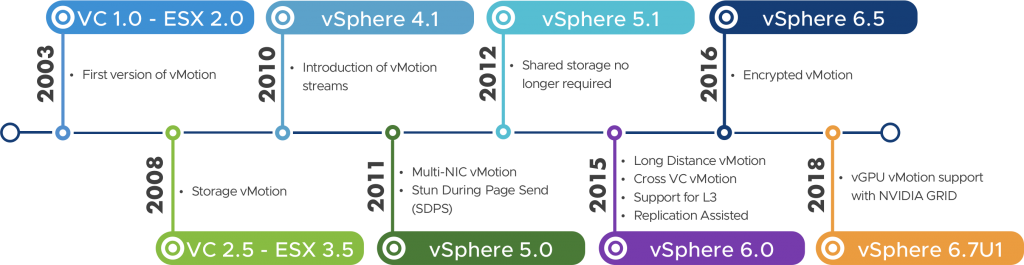
<p style="text-align: justify;">vSphere 5 introduces a new enhancement that ensures vMotion will not fail due to memory copy convergence issues. As noted in the “Architecture” section, transfer of the virtual machine’s memory contents during the vMotion process involves an iterative precopy procedure. In most cases, a precopy iteration should take less time to complete than the previous iteration. <strong>However, a pathological case where the virtual machine modifies memory faster than it can be transferred—due to workload characteristics or network infrastructure limitations—results in aborting vMotion</strong> in vSphere 4.1 and prior releases, because precopy fails to make forward progress. <strong>The enhancement in vSphere 5 slows down the virtual machine during such pathological cases and ensures that the memory modification rate is slower than the precopy transfer rate, thereby preventing any possible vMotion failures</strong>.</p>
</blockquote>
<p style="text-align: center;"><a href="http://www.hypervisor.fr/wp-content/uploads/2019/08/vMotion-timeline3-1024x265.png" title="vMotion-timeline3-1024x265" rel="lightbox[5925]"><img class="aligncenter size-full wp-image-5928" title="vMotion-timeline3-1024x265" src="http://www.hypervisor.fr/wp-content/uploads/2019/08/vMotion-timeline3-1024x265.png" alt="" width="491" height="127" /></a></p>
<p style="text-align: justify;">Vous l&#8217;aurez compris, si l&#8217;ESX source n&#8217;arrive pas à &#8220;dépiler&#8221; la vram suffisamment vite lors d&#8217;un vMotion, l&#8217;execution de la VM en question est ralentie jusqu&#8217;à ce qu&#8217;une convergence soit possible, <a href="http://www.hypervisor.fr/?p=2865" target="_blank">dans la limite des timeout par défaut</a>.</p>
<p style="text-align: justify;">Cette fonctionnalité semble parfaite pour les monster VM qu&#8217;on a du mal à évacuer lors d&#8217;un passage en maintenance mode mais elle est aussi très &#8220;problématique&#8221; lorsque l&#8217;infrastructure réseau n&#8217;est pas ou plus adaptée. D&#8217;où le très discret &#8220;network infrastructure limitations&#8221; dans le descriptif.</p>
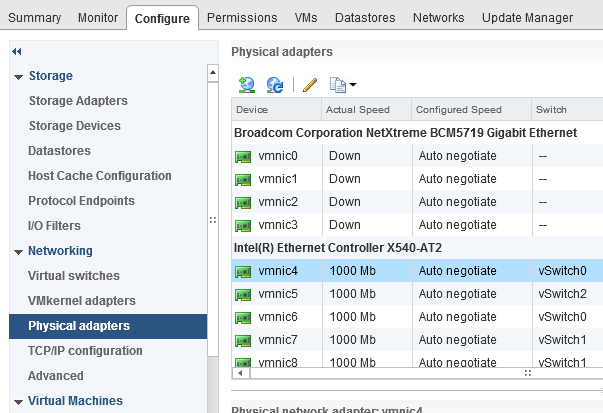
<p style="text-align: justify;">En l&#8217;occurence, le client en question mène une campagne de &#8220;refresh&#8221; de son parc afin de remplacer des machines ayant largement dépassé leur date de péremption technique. Mais sans faire évoluer son réseau. Il se retrouve donc avec machine de 2To de RAM sur un réseau 1GbE.</p>
<p style="text-align: center;"><a href="http://www.hypervisor.fr/wp-content/uploads/2019/08/sdps_gbe.png" title="sdps_gbe" rel="lightbox[5925]"><img class="aligncenter size-full wp-image-5929" title="sdps_gbe" src="http://www.hypervisor.fr/wp-content/uploads/2019/08/sdps_gbe.png" alt="" width="482" height="330" /></a></p>
<p style="text-align: justify;">Evidement, à mesure que des VM de plus en plus grosses sont provisionnées sur ces environnements, les fenêtres de maintenance sont de plus en plus grande mais surtout des ralentissements apparaissent lors des mise en maintenance ou simplement quand DRS déplace de VM :</p>
<blockquote>
<p style="text-align: justify;">018-12-13T16:32:29.378Z cpu18:74031)VMotion: 4943: 7811810961774337297 S: <strong>Not enough forward progress, enabling SDPS</strong> (Pages left to send: prev2 693298, prev 461605, cur 497489, network bandwidth ~28.619 MB/s, 94% t2d)<br />
2018-12-13T16:38:32.426Z cpu188:72874)VMotion: 4943: 7811810962073701659 S: Not enough forward progress, enabling SDPS (Pages left to send: prev2 126959, prev 18467, cur 15909, network bandwidth ~60.158 MB/s, 103% t2d)</p>
</blockquote>
<p style="text-align: justify;">SDPS fait son boulot et il le fait bien alors évidement pour faire passer des VM de 256Go qui bossent fort dans du 1GbE ca pique&#8230; Donc la prochaine fois qu&#8217;on vous dit que la bande passante de vmotion peut être sacrifiée, vous saurez quoi répondre.</p>
<p style="text-align: justify;">Evidement, <a href="https://kb.vmware.com/s/article/2007595" target="_blank">il y a un (mauvais) plan B</a> :</p>
<blockquote>
<p style="text-align: justify;">To work around this issue, the Stun During Page Send (SDPS) feature can be disabled on a per-host basis.<br />
[...]<br />
Change the value of <strong>Migrate.SdpsEnabled</strong> to 0.</p>
</blockquote>
<p style="text-align: justify;">Nous en profitons pour souligner un autre &#8220;petit&#8221; détail du texte au sujet du Page Tracing :</p>
<blockquote>
<p style="text-align: justify;">During the pre-copy phase, the vCPU’s, in use by the virtual machine, are <strong>briefly stunned to install the page tracers</strong>.</p>
</blockquote>
]]></content:encoded>
			<wfw:commentRss>http://www.hypervisor.fr/?feed=rss2&amp;p=5925</wfw:commentRss>
		<slash:comments>0</slash:comments>
		</item>
		<item>
		<title>storageRM level 1</title>
		<link>http://www.hypervisor.fr/?p=5252</link>
		<comments>http://www.hypervisor.fr/?p=5252#comments</comments>
		<pubDate>Fri, 08 Aug 2014 13:31:57 +0000</pubDate>
		<dc:creator>NiTRo</dc:creator>
				<category><![CDATA[Kb]]></category>
		<category><![CDATA[Performance]]></category>
		<category><![CDATA[Tips & Tricks]]></category>
		<category><![CDATA[VMware]]></category>
		<category><![CDATA[graylog2]]></category>
		<category><![CDATA[oneliner]]></category>
		<category><![CDATA[PowerCLI]]></category>
		<category><![CDATA[SIOC]]></category>
		<category><![CDATA[syslog]]></category>
		<category><![CDATA[troubleshooting]]></category>

		<guid isPermaLink="false">http://www.hypervisor.fr/?p=5252</guid>
		<description><![CDATA[Instruit par la kb Troubleshooting Storage I/O Control (1022091), nous nous sommes rendu compte qu&#8217;en fixant le log level à 1, le service storageRM crachait les informations de latency, qdepth et iops des datastores concernés dans les logs d&#8217;ESXi (et donc vers le(s) serveur(s) syslog) toutes les 4 secondes. Sur une grosse infra ça peut faire [...]]]></description>
			<content:encoded><![CDATA[<p style="text-align: justify;">Instruit par la kb <a href="http://kb.vmware.com/kb/1022091" target="_blank">Troubleshooting Storage I/O Control (1022091)</a>, nous nous sommes rendu compte qu&#8217;en fixant le log level à 1, le service storageRM crachait les informations de latency, qdepth et iops des datastores concernés dans les logs d&#8217;ESXi (et donc vers le(s) serveur(s) syslog) <a href="http://cormachogan.com/2013/06/20/storage-io-control-workload-injector-behaviour/" target="_blank">toutes les 4 secondes</a>. Sur une grosse infra ça peut faire beaucoup mais ça offre de belles perspective de monitoring/troubleshooting :</p>
<p style="text-align: center;"><a href="http://files.hypervisor.fr/img/StorageRM_1/sioc_avglatency_agg.png" target="_blank"><img class="aligncenter" src="http://files.hypervisor.fr/img/StorageRM_1/sioc_avglatency_agg.png" alt="" width="494" height="407" /></a></p>
<p style="text-align: center;"><a href="http://files.hypervisor.fr/img/StorageRM_1/sioc_datastore.png" title="sioc_datastore" rel="lightbox[5252]"><img class="alignnone size-thumbnail wp-image-5256" title="sioc_datastore" src="http://www.hypervisor.fr/wp-content/uploads/2014/08/sioc_datastore-150x150.png" alt="" width="150" height="150" /></a> <a href="http://files.hypervisor.fr/img/StorageRM_1/sioc_avglatency.png" title="sioc_avglatency" rel="lightbox[5252]"><img class="alignnone size-thumbnail wp-image-5255" title="sioc_avglatency" src="http://www.hypervisor.fr/wp-content/uploads/2014/08/sioc_avglatency-150x150.png" alt="" width="150" height="150" /></a> <a href="http://files.hypervisor.fr/img/StorageRM_1/sioc_iops.png" title="sioc_iops" rel="lightbox[5252]"><img class="alignnone size-thumbnail wp-image-5257" title="sioc_iops" src="http://www.hypervisor.fr/wp-content/uploads/2014/08/sioc_iops-150x150.png" alt="" width="150" height="150" /></a></p>
<p style="text-align: left;">Et voici le oneliner PowerCLI pour le faire vite et bien :</p>
<pre class="brush: powershell; title: ; notranslate">Get-View -ViewType HostSystem|?{$_.Runtime.ConnectionState -eq &quot;connected&quot; -and $_.config.product.ProductLineId -eq &quot;embeddedEsx&quot; -and ($_.Config.Option|?{$_.Key -eq &quot;Misc.SIOControlLogLevel&quot;}).Value -ne &quot;1&quot;}|%{(Get-View $_.ConfigManager.AdvancedOption).UpdateOptions((New-Object VMware.Vim.OptionValue -Property @{Key=&quot;Misc.SIOControlLogLevel&quot;;Value=[Int64]1}))}</pre>
]]></content:encoded>
			<wfw:commentRss>http://www.hypervisor.fr/?feed=rss2&amp;p=5252</wfw:commentRss>
		<slash:comments>9</slash:comments>
		</item>
		<item>
		<title>svmotion switchover time</title>
		<link>http://www.hypervisor.fr/?p=2865</link>
		<comments>http://www.hypervisor.fr/?p=2865#comments</comments>
		<pubDate>Wed, 13 Apr 2011 22:21:48 +0000</pubDate>
		<dc:creator>NiTRo</dc:creator>
				<category><![CDATA[Kb]]></category>
		<category><![CDATA[Tips & Tricks]]></category>
		<category><![CDATA[VMware]]></category>
		<category><![CDATA[PowerCLI]]></category>
		<category><![CDATA[scripting]]></category>
		<category><![CDATA[SVMotion]]></category>
		<category><![CDATA[troubleshooting]]></category>
		<category><![CDATA[VMotion]]></category>

		<guid isPermaLink="false">http://www.hypervisor.fr/?p=2865</guid>
		<description><![CDATA[MAJ 02/02/2012 : remplacement du script par un one-liner  
Lors d&#8217;une tentative de svmotion nous avons été confronté à un timeout sans plus de détails :

C&#8217;est dans le vmware.log de la vm qu&#8217;on trouve la cause de l’échec (c&#8217;est souvent le cas d&#8217;ailleurs&#8230;) :

Migrate_SetFailure: The migration has exceeded the maximum switchover time of 100 second(s).  ESX has [...]]]></description>
			<content:encoded><![CDATA[<p style="text-align: justify;"><em><strong><strong><span style="color: #ff0000;">MAJ 02/02/2012</span></strong> </strong>: remplacement du script par un one-liner <img src='http://www.hypervisor.fr/wp-includes/images/smilies/icon_smile.gif' alt=':)' class='wp-smiley' /> </em></p>
<p style="text-align: justify;">Lors d&#8217;une tentative de svmotion nous avons été confronté à un timeout sans plus de détails :</p>
<p><img class="aligncenter size-full wp-image-2866" title="switchover_time" src="http://www.hypervisor.fr/wp-content/uploads/2011/04/switchover_time.png" alt="" width="387" height="56" /></p>
<p style="text-align: justify;">C&#8217;est dans le vmware.log de la vm qu&#8217;on trouve la cause de l’échec (c&#8217;est souvent le cas d&#8217;ailleurs&#8230;) :</p>
<blockquote>
<p style="text-align: justify;">Migrate_SetFailure: The migration has exceeded the maximum switchover time of 100 second(s).  ESX has preemptively failed the migration to allow the virtual machine to continue running on the source. To avoid this failure, either increase the maximum allowable switchover time or wait until the virtual machine is performing a less intensive workload.</p>
</blockquote>
<p style="text-align: justify;">Pourtant, depuis vSphere 4.0, <strong>un svmotion ne nécessite plus une phase de recopie de la ram grâce au &#8220;Fast Suspend/Resume&#8221;</strong> <a href="http://mylearn.vmware.com/courseware/50948/TA2623_formatted.pdf" target="_blank">comme détaillé dans une session du vmworld 2009</a>. Il ne nous restait donc plus que la piste de l&#8217;activité des vmdk mais la kb dédié à ce problème (<a href="http://kb.vmware.com/kb/1010045" target="_blank">Using Storage vMotion to migrate a virtual machine with many disks may timeout</a>) fait référence à des messages d&#8217;erreurs aux quels nous n&#8217;avons pas été confrontés.</p>
<p style="text-align: justify;">Dans le doute et n&#8217;ayant pas le temps d&#8217;investiguer d&#8217;avantage, nous avons augmenté les valeurs de &#8220;switchover time&#8221; pour vmotion et svmotion à l&#8217;aide de ce script PowerCLI, ce qui nous a permis de régler le problème :</p>

<div class="wp_syntax"><div class="code"><pre class="powershell" style="font-family:monospace;">Get<span style="color: pink;">-</span>View <span style="color: pink;">-</span>ViewType VirtualMachine<span style="color: pink;">|?</span><span style="color: #000000;">&#123;</span><span style="color: #FF0000;">-not</span> <span style="color: #000080;">$_</span>.Config.Template<span style="color: #000000;">&#125;</span><span style="color: pink;">|%</span><span style="color: #000000;">&#123;</span><span style="color: #000080;">$_</span>.ReconfigVM<span style="color: #000000;">&#40;</span><span style="color: #000000;">&#40;</span><span style="color: #008080; font-weight: bold;">New-Object</span> VMware.Vim.VirtualMachineConfigSpec <span style="color: #008080; font-style: italic;">-Property</span> <span style="color: pink;">@</span><span style="color: #000000;">&#123;</span>extraconfig<span style="color: pink;">=@</span><span style="color: #000000;">&#40;</span><span style="color: #000000;">&#40;</span><span style="color: #008080; font-weight: bold;">New-Object</span> VMware.Vim.optionvalue <span style="color: #008080; font-style: italic;">-Property</span> <span style="color: pink;">@</span><span style="color: #000000;">&#123;</span>Key<span style="color: pink;">=</span><span style="color: #800000;">&quot;vmotion.maxSwitchoverSeconds&quot;</span>;Value<span style="color: pink;">=</span><span style="color: #800000;">&quot;200&quot;</span><span style="color: #000000;">&#125;</span><span style="color: #000000;">&#41;</span>;<span style="color: #000000;">&#40;</span><span style="color: #008080; font-weight: bold;">New-Object</span> VMware.Vim.optionvalue <span style="color: #008080; font-style: italic;">-Property</span> <span style="color: pink;">@</span><span style="color: #000000;">&#123;</span>Key<span style="color: pink;">=</span><span style="color: #800000;">&quot;fsr.maxSwitchoverSeconds&quot;</span>;Value<span style="color: pink;">=</span><span style="color: #800000;">&quot;200&quot;</span><span style="color: #000000;">&#125;</span><span style="color: #000000;">&#41;</span><span style="color: #000000;">&#41;</span><span style="color: #000000;">&#125;</span><span style="color: #000000;">&#41;</span><span style="color: #000000;">&#41;</span><span style="color: #000000;">&#125;</span></pre></div></div>

<p style="text-align: justify;">Le paramètre &#8221;vmotion.maxSwitchoverSeconds&#8221;, nous l&#8217;avons trouvé dans les commentaires <a href="http://blogs.vmware.com/uptime/2011/02/vmotion-whats-going-on-under-the-covers.html" target="_blank">d&#8217;un post très intéressant du blog VMware Uptime</a> au sujet d&#8217;une fonctionnalité peut connu de vmotion (vSphere 4.1+) : &#8220;<strong>quick resume</strong>&#8220;</p>
<blockquote>
<p style="text-align: justify;">In the event the VM passes the 100 second check, VMotion will stun the source and start running on the destination. <strong>While the destination runs, the source will transmit the remaining pages to the destination</strong> using the “quick resume” capability introduced with vSphere 4.1.</p>
</blockquote>
<p style="text-align: justify;">Vous avez bien lu, <strong>la vm de destination est démarrée alors le vmotion n&#8217;est techniquement pas terminé et les pages restantes sont migrées en tache de fond</strong>. Surpuissant.</p>
<p style="text-align: justify;">Comme le précise <a href="http://www.yellow-bricks.com/2011/04/13/vmotion-and-quick-resume/" target="_blank">Duncan dans son post concernant ce sujet</a>, l&#8217;impact sur les performances en cas d&#8217;accès à une page restée sur la vm source (accès via le réseau donc) compense largement l&#8217;agilité de la solution dans la majorité des cas.</p>
]]></content:encoded>
			<wfw:commentRss>http://www.hypervisor.fr/?feed=rss2&amp;p=2865</wfw:commentRss>
		<slash:comments>9</slash:comments>
		</item>
		<item>
		<title>Get-VMlog : suivre vmware.log en powershell</title>
		<link>http://www.hypervisor.fr/?p=2316</link>
		<comments>http://www.hypervisor.fr/?p=2316#comments</comments>
		<pubDate>Mon, 16 Aug 2010 17:07:58 +0000</pubDate>
		<dc:creator>NiTRo</dc:creator>
				<category><![CDATA[Tips & Tricks]]></category>
		<category><![CDATA[VMware]]></category>
		<category><![CDATA[PowerCLI]]></category>
		<category><![CDATA[powershell]]></category>
		<category><![CDATA[scripting]]></category>
		<category><![CDATA[troubleshooting]]></category>

		<guid isPermaLink="false">http://www.hypervisor.fr/?p=2316</guid>
		<description><![CDATA[Malgré tout le travail des développeurs, la version 4.1 du PowerCLI ne permet toujours pas d&#8217;utiliser la cmdlet &#8220;get-content -wait&#8221; sur un fichier situé dans un datastore vmware. Impossible donc de suivre le fichier vmware.log d&#8217;une VM pour une séance de troubleshooting. Impossible ? Non ! Rien n&#8217;est impossible en powershell :


Nous avons concocté un [...]]]></description>
			<content:encoded><![CDATA[<p style="text-align: justify;">Malgré tout le travail des développeurs, <a href="http://www.vmware.com/support/developer/PowerCLI/PowerCLI41/powercli41-201007-releasenotes.html">la version 4.1 du PowerCLI</a> ne permet toujours pas d&#8217;utiliser la cmdlet &#8220;get-content -wait&#8221; sur un fichier situé dans un datastore vmware. Impossible donc de suivre le fichier vmware.log d&#8217;une VM pour une séance de troubleshooting. Impossible ? Non ! <strong>Rien n&#8217;est impossible en powershell</strong> :</p>
<p style="text-align: center;"><object classid="clsid:d27cdb6e-ae6d-11cf-96b8-444553540000" width="480" height="238" codebase="http://download.macromedia.com/pub/shockwave/cabs/flash/swflash.cab#version=6,0,40,0"><param name="allowFullScreen" value="true" /><param name="allowScriptAccess" value="always" /><param name="src" value="http://www.dailymotion.com/swf/video/xegopp?additionalInfos=0" /><param name="allowfullscreen" value="true" /><embed type="application/x-shockwave-flash" width="480" height="238" src="http://www.dailymotion.com/swf/video/xegopp?additionalInfos=0" allowscriptaccess="always" allowfullscreen="true"></embed></object><strong><a href="http://www.dailymotion.com/video/xegopp_get-and-follow-vmware-log-with-powe_tech"></a></strong><em><a href="http://www.dailymotion.com/fr/channel/tech"><br />
</a></em></p>
<p style="text-align: justify;">Nous avons concocté un script qui va, via la cmdlet <strong>Copy-DatastoreItem</strong>, copier le fichier vmware.log de la VM dans le répertoire temporaire de l&#8217;utilisateur, en <strong>afficher le contenu avec un code couleur</strong> en fonction de la source (vmx, vcpu, mks, etc&#8230;), recopier le fichier toutes les <strong>5 secondes </strong>(paramétrable avec -delay=&#8221;x&#8221;) et en extraire à chaque fois <strong>le différentiel</strong> pour l&#8217;afficher à la façon de &#8220;<strong>tail -f</strong>&#8220;. Si le fichier vmware.log est locké ou déplacé pendant l&#8217;exécution du script (<strong>vmotion/svmotion</strong> par exemple), le script va bouclé jusqu&#8217;à ce qu&#8217;il soit de nouveau disponible et chercher le nouvel emplacement du fichier si besoin.</p>
<p style="text-align: justify;">Dans la vidéo si dessus, les éléments successifs correspondent à des opérations (vmotion, snapshot, etc&#8230;)</p>
<p style="text-align: justify;"><strong>L&#8217;intégralité de ce qui a été affiché dans la console est également redirigé vers un fichier log</strong> <strong>consolidé </strong>$env:temp\&#8221;nom-de-la-vm&#8221;-full.log (par ex : C:\DOCUME~1\admin\LOCALS~1\Temp\1\vm-full.log)</p>
<p style="text-align: center;">
<div class="wp-caption aligncenter" style="width: 85px"><a href="http://hypervisor.free.fr/get-vmlog.ps1"><img class=" " title="get-vmlog.ps1" src="http://hypervisor.free.fr/img/download_icon_300.png" alt="" width="75" height="64" /></a><p class="wp-caption-text">download</p></div>
]]></content:encoded>
			<wfw:commentRss>http://www.hypervisor.fr/?feed=rss2&amp;p=2316</wfw:commentRss>
		<slash:comments>1</slash:comments>
		</item>
		<item>
		<title>Utiliser dd sur ESXi 4.0</title>
		<link>http://www.hypervisor.fr/?p=1969</link>
		<comments>http://www.hypervisor.fr/?p=1969#comments</comments>
		<pubDate>Wed, 07 Apr 2010 17:48:12 +0000</pubDate>
		<dc:creator>NiTRo</dc:creator>
				<category><![CDATA[HowTo]]></category>
		<category><![CDATA[Tips & Tricks]]></category>
		<category><![CDATA[VMware]]></category>
		<category><![CDATA[troubleshooting]]></category>
		<category><![CDATA[VMFS]]></category>

		<guid isPermaLink="false">http://www.hypervisor.fr/?p=1969</guid>
		<description><![CDATA[Comme expliqué il y a longtemps par Mike La Spina sur son blog et lors d&#8217;une session dédiée au VMFS au VMworld 2007, il est possible de sauvegarder les &#8220;Metadata blocks&#8221; d&#8217;un volume VMFS vers un fichier à l&#8217;aide de l&#8217;outil dd. En cas de suppression accidentel du volume, il &#8220;suffit&#8221; de restaurer les blocks [...]]]></description>
			<content:encoded><![CDATA[<p style="text-align: justify;">Comme expliqué il y a longtemps par <a href="http://blog.laspina.ca/ubiquitous/understanding-vmfs-volumes" target="_blank">Mike La Spina sur son blog</a> et lors <a href="http://communities.vmware.com/servlet/JiveServlet/download/781793-3097/PS_TA48_288131_166-1_FIN_v2.pdf" target="_blank">d&#8217;une session dédiée au VMFS au VMworld 2007</a>, il est possible de sauvegarder les &#8220;Metadata blocks&#8221; d&#8217;un volume VMFS vers un fichier à l&#8217;aide de l&#8217;outil dd. En cas de suppression accidentel du volume, il &#8220;suffit&#8221; de restaurer les blocks à partir du fichier de sauvegarde produit par dd. Sur ESX/ESXi 3.5 et ESX 4.0 la manipulation (restore) se passe sans problème mais sous ESXi 4.0 la commande produit un message d&#8217;erreur obscure :</p>
<blockquote><p>Function not implemented</p></blockquote>
<p>La solution était caché dans une <a href="http://kb.vmware.com/kb/1008886" target="_blank">kb VMware</a> sur le troubleshooting d&#8217;erreur lors de la creation d&#8217;un datastore :</p>
<blockquote><p>Note: If you are using VMware ESXi or the &lt;identifier&gt; you are specifying is located within the /vmfs/ directory, you may need to append the <strong>conv=notrunc</strong> parameter to the dd command. Not doing so may result in a Function not implemented error.</p></blockquote>
<p>Alleluia !</p>
]]></content:encoded>
			<wfw:commentRss>http://www.hypervisor.fr/?feed=rss2&amp;p=1969</wfw:commentRss>
		<slash:comments>0</slash:comments>
		</item>
		<item>
		<title>MAJ auto des vmtools en script</title>
		<link>http://www.hypervisor.fr/?p=899</link>
		<comments>http://www.hypervisor.fr/?p=899#comments</comments>
		<pubDate>Thu, 09 Jul 2009 19:44:07 +0000</pubDate>
		<dc:creator>NiTRo</dc:creator>
				<category><![CDATA[HowTo]]></category>
		<category><![CDATA[Tips & Tricks]]></category>
		<category><![CDATA[VMware]]></category>
		<category><![CDATA[scripting]]></category>
		<category><![CDATA[troubleshooting]]></category>

		<guid isPermaLink="false">http://www.hypervisor.fr/?p=899</guid>
		<description><![CDATA[Tous les admins ESX (et même ceux d&#8217;Hyper-XEN) vous le diront : les vmtools sont indispensables ! Et comme disait l&#8217;autre, &#8220;est fou qui s&#8217;en fou !&#8220;. Et pourtant certains s&#8217;en passent&#8230;
Par contre, qu&#8217;ils soient &#8220;up-to-date&#8221; fait bien évidement parti des Best Practices mais bon, il arrive que parfois, de façon totalement involontaire, pendant un [...]]]></description>
			<content:encoded><![CDATA[<p>Tous les admins ESX (et même ceux d&#8217;Hyper-XEN) vous le diront : les vmtools sont indispensables ! Et comme disait l&#8217;autre, &#8220;<em>est fou qui s&#8217;en fou !</em>&#8220;. Et pourtant certains s&#8217;en passent&#8230;<br />
Par contre, qu&#8217;ils soient &#8220;up-to-date&#8221; fait bien évidement parti des Best Practices mais bon, il arrive que parfois, de façon totalement involontaire, pendant un moment d&#8217;égarement, il puisse y avoir 1 voir 2 VM dans votre infrastructure (maximum hein !) dont les vmtools ne soient pas super up-to-date&#8230; Pour ceux là, lisez ce qui suit :</p>
<p><a href="http://www.hypervisor.fr/wp-content/uploads/2009/07/heap_global_cartel.jpg">Après plusieurs semaines de troobleshooting</a> et <a href="http://communities.vmware.com/thread/182217">avec l&#8217;aide de la communauté vmware</a>, nous avons pu identifier un effet de bord lié à la version des vmtools. <strong>Dans certaines circonstances, la DCUI d&#8217;ESXi peut crasher en raison de vmtools pas à jour.</strong> Par chance, l&#8217;hyperviseur n&#8217;en souffre pas donc les VM continuent à fonctionner mais les agents VPXA et AAM ne répondent plus. Seule solution, se connecter directement à l&#8217;ESXi avec le client VI (ou Vsphere) pour faire un shutdown des VM puis un hard reset du serveur physique car impossible de faire un restart.</p>
<p>Pour éviter cela, il est possible d&#8217;automatiser (si besoin) la mise à jour des vmtools au démarrage de la VM grâce à cette option :</p>
<p><a href="http://www.hypervisor.fr/wp-content/uploads/2009/07/auto_upgrade_vmtools.jpg" title="auto upgrade vmtools" rel="lightbox[899]"><img class="aligncenter size-medium wp-image-901" title="auto upgrade vmtools" src="http://www.hypervisor.fr/wp-content/uploads/2009/07/auto_upgrade_vmtools-300x237.jpg" alt="" width="300" height="237" /></a></p>
<p>Voici un petit script (<a href="http://tech.zsoldier.com/2008/11/powershell-script-to-enable-check-and.html">piqué à Chris Nakagaki</a>) pour le faire sur toutes vos VM sans peine (et activer la syncro de temps pour ceux veulent) :</p>

<div class="wp_syntax"><div class="code"><pre class="powershell" style="font-family:monospace;">get<span style="color: pink;">-</span>vm  <span style="color: pink;">|</span> <span style="color: #008080; font-weight: bold;">foreach-object</span> <span style="color: #000000;">&#123;</span>
<span style="color: #800080;">$vmConfigSpec</span> <span style="color: pink;">=</span> <span style="color: #008080; font-weight: bold;">New-Object</span> VMware.Vim.VirtualMachineConfigSpec
<span style="color: #800080;">$vmConfigSpec</span>.Tools <span style="color: pink;">=</span> <span style="color: #008080; font-weight: bold;">New-Object</span> VMware.Vim.ToolsConfigInfo
<span style="color: #800080;">$vmConfigSpec</span>.Tools.ToolsUpgradePolicy <span style="color: pink;">=</span> <span style="color: #800000;">&quot;UpgradeAtPowerCycle&quot;</span>
<span style="color: #008000;"># $vmConfigSpec.tools.syncTimeWithHost = $true</span>
<span style="color: #000000;">&#40;</span>Get<span style="color: pink;">-</span>View <span style="color: #000080;">$_</span>.ID<span style="color: #000000;">&#41;</span>.ReconfigVM<span style="color: #000000;">&#40;</span><span style="color: #800080;">$vmConfigSpec</span><span style="color: #000000;">&#41;</span>
<span style="color: #000000;">&#125;</span></pre></div></div>

<p><span style="color: #ff0000;">/!\ En cas de MAJ des vmtools, la VM reboot automatiquement  /!\</span></p>
<p><span style="color: #ff0000;">/!\ Cette fonction n&#8217;est active que si des vmtools existent déjà dans la VM /!\</span></p>
]]></content:encoded>
			<wfw:commentRss>http://www.hypervisor.fr/?feed=rss2&amp;p=899</wfw:commentRss>
		<slash:comments>5</slash:comments>
		</item>
	</channel>
</rss>